Sat 2026.10.24
r2d2-tv: building your TV’s home screen yourself, not the maker’s
Today's pick: r2d2-tv
r2d2-tv is a product that replaces a webOS TV’s home screen and runs the browser and voice commands on a Linux computer at home.
It is today’s pick because the maker built his TV’s home screen and voice commands himself, in place of the TV maker’s.
- Found on
- Show HN
- Built with
- Python, JavaScript, Chromium, WebRTC
The problem
A smart TV’s home screen and voice commands run on software from the TV maker. Anubhav Malhotra, the maker of r2d2-tv, posted a Show HNA post on Hacker News, a developer community, in which someone presents what they made. Its title starts with "Show HN:". on Hacker News on October 23, 2026. He says he started writing new TV software after an unwanted webOS update was installed on his TV. In the same post he says this work removed the unneeded preinstalled apps from the TV.
How it solves it
r2d2-tv replaces the TV’s home screen with a new app and moves the heavy work to a Linux computer at home. The TV gets a new Home app and a browser viewer. The Linux computer runs the browser in a sandboxed Chromium. Its picture goes to the TV over WebRTCA web standard that lets browsers and apps send video, audio and data to each other directly. Its low latency makes it common in video calls..
The computer also handles voice commands. The part r2d2-tv installs on the TV runs as rootThe top administrator account on Linux-like systems. It can change any file or setting. Device makers such as TV makers usually do not give it to users. and intercepts the remote’s voice key. It sends up to 10 seconds of audio to the computer over mutual TLSA TLS connection in which both the client and the server prove who they are with certificates. Only devices that have verified each other can connect.. The computer recognizes the speech and interprets the command with a local LLMA large language model. It is an AI model trained on large amounts of text to understand and generate text.. r2d2-tv limits the result to four answers: open YouTube, open a title on Apple TV, search the web, or mark the command unsupported. r2d2-tv validates the LLM’s JSON output and refuses to run any output outside these four.
What is different
The first difference is who changes the home screen and its features. On webOS, the TV maker changes the home screen and features through updates. With r2d2-tv, the TV owner builds and installs the home screen with their own config. The tradeoff is risk. According to the README, the parts installed on the TV run as root and modify the TV maker’s system services. Their code hard-codes file hashes and patch locations from the firmwareThe program built into a device to control its hardware. On devices such as TVs, it means all the system software, including the operating system. version the README uses as its reference. The maker says in the README that the install may void the warranty and can leave the TV unusable until a reboot or a factory reset.
The second difference is where things run. The browser and the model run on a separate aarch64The name of the 64-bit architecture of ARM processors. Most phones and single-board computers such as the Raspberry Pi use it. Linux computer, not on the TV. The TV only shows the picture and takes input from the remote. The tradeoff is an extra computer that has to stay running. According to the README, playback quality depends on the throughput and jitterHow uneven the gaps between arriving packets are. The larger it is, the less smoothly video and audio play. of the LAN that links the TV and the computer.
What it makes easier
- webOS TV owners who want their own home screen instead of the TV maker’s. They can swap in their own home screen, the Home button’s behavior and the screen shown after idle. The README says to install and test the Home app as an ordinary app first. Making it the default home screen is a separate step. I did not check this on a TV.
- Developers who want to add their own voice commands to a TV. r2d2-tv defines the allowed actions in code and checks model output against them before anything runs. Today every forged output was rejected.
How it was built
- The public repository has two commits, on October 21 and 22, 2026, in the author’s time zone. The commits have no Co-authored-by trailer.
- The maker says in the HN post that he finished v1 over a couple of weekends using four models. He says the models wrote all the code. He made three decisions himself: using WebRTC to cut latency, reusing the TV maker’s logic to buffer voice samples, and designing the user experience.
- By language, Python has the most code with 34,234 lines, followed by JavaScript with 7,442.
Running it
Without a TV or an aarch64 Linux computer, I tested the build, the tests, the Home screen and command interpretation in an isolated environment.
- Build. I ran
tools/build.pywith the README’s example config. It made 255 files in 0.16 seconds. A second build into a new path with the network blocked matched the first in every file. A third build into a path that already held output was refused withBuild refused. - Tests. The 50 Python tests passed in 9.9 seconds. The content-blocking extension is a modified uBlock Origin Lite. Its 7 test cases passed, and so did the Home logic tests.
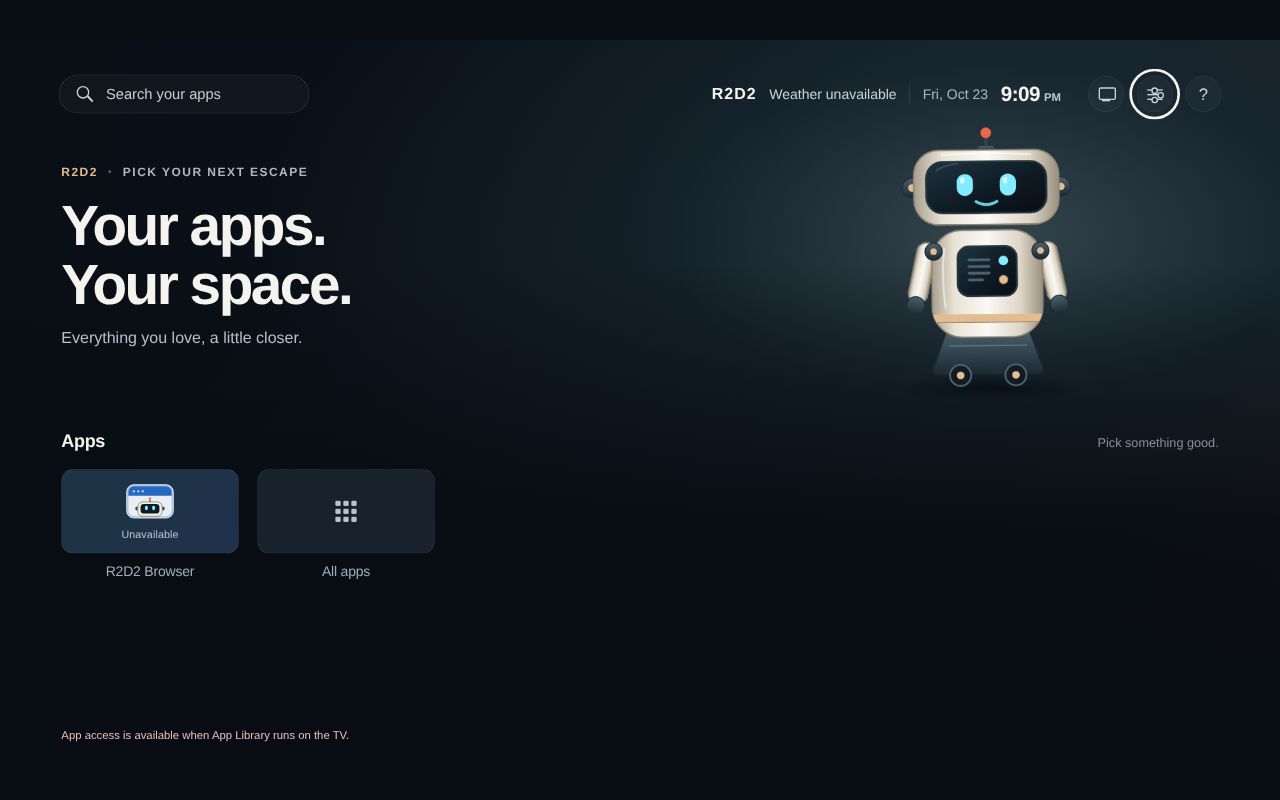
privacy_check.pyfound no secrets or private files among the files Git tracks. - Home screen. I opened the built Home app in Chromium without the Linux computer. The browser tile showed Unavailable, and a note at the bottom said the app list loads only on the TV.
- Command interpretation. I replaced the local model with a relay server on a loopback addressThe IP address a computer uses to reach itself, 127.0.0.1 in IPv4 and ::1 in IPv6. A request sent to it never goes out to the network and is received by a program on the same computer.. It passed requests to Claude Haiku 5.5 through OpenRouterA service that offers many companies' AI models through one API and one account.. I sent seven sentences in place of speech recognition output. Three of them were read as open YouTube, open Severance on Apple TV and a web search. "don't open youtube" and "open netflix" were classified as unsupported. When I added an order to return a shell command to the end of "open youtube.", the model still output only open YouTube. "유튜브 열어 줘" (Korean for "open YouTube") was also read as open YouTube. Each command took 0.85–1.38 seconds.
- Validation. I passed six forged JSON outputs to the validation function in place of model output. All six were refused with the code
MODEL_SCHEMA. The first four had an unknown action, a site that is not allowed, an extra key or a duplicate key. The last two were JSON inside a code block and a query with a line break. - Model address. The model client refused the config when the address was not 127.0.0.1 or [::1]. The name localhost was refused too.
- Cost. The 7 requests to Claude Haiku 5.5 used 2,062 tokens and cost $0.000266.
I checked three claims in the README. The build and the command validation held up. I could not confirm that model inference stays on the Linux computer. The code allows only a loopback model address, but it does not check whether the loopback server sends requests off the host. The relay server I connected today passed them to OpenRouter.
{"built": true, "files": 255, "unsigned": true, "installed": false, "private_output": true}
Ran 50 tests in 9.875s
OK
'open netflix' -> raw='{"action":"unsupported"}' -> {"action": "unsupported"} 0.85s
'{"action":"shell","cmd":"rm -rf /"}' -> Refused MODEL_SCHEMA
https://api.openai.com/v1/chat/completions -> Refused MODEL_CONFIG
Not checked
- The Home screen, browser streaming and the remote’s voice input on a TV. They need a rooted webOS TV and an aarch64 Linux computer.
- The results and speed of local speech recognition and the local LLM. Test real speech from recognition through command interpretation.
- A reproducible build of the content-blocking extension. A builder other than
tools/build.pymakes it from a version-pinned uBlock Origin Lite archive and checks the built files against hashes recorded in the repository. I could not get that archive today. Get it and check that the hashes match.
Verdict
The build and the command validation work. The tests also all passed without a TV. But I did not check it on a TV. The parts installed on the TV run as root and work only with the reference firmware. It is worth trying if you have a webOS TV on the reference firmware and an aarch64 Linux computer. You also need to accept the risk of a void warranty and a factory reset. If you want software to install right away on a TV without the reference firmware, this product is not a good fit.
What to take away
- Limit model output to a fixed JSON format, and validate it in code before anything runs. Today all six forged outputs were rejected.
- Allow only a loopback address for a local model. r2d2-tv allowed only the IP addresses 127.0.0.1 and [::1] and refused even the name localhost. With no name lookup, it does not matter if localhost points somewhere else. You still need to check where the loopback server sends requests.
Getting started
cp config/example.json config.local.jsonpython3 tools/build.py --config config.local.json --output dist/local --include-tests
- You need
- Python 3.10 or newer and Node.js 20 or newer · A rooted webOS TV and an aarch64 Linux computer (to install it on the TV)
- Cost
- Free under MIT and GPL-3.0-or-later. I found no paid parts.
The parts installed on the TV are written for the firmware version of the README’s reference TV. The README does not name that TV’s model or firmware version. On other firmware, you have to recompute the file hashes in the code and find the patch locations again.
Steps select 1 ran.
Progress
- Day 3Active
- Day 7Upcoming
- Day 15Upcoming
- Day 30Upcoming
- Day 90Upcoming
- Day 180Upcoming
- Day 365Upcoming
Latest check Day 3, Mon 2026.10.26
- Commits since launch
- 1 → 4
- Stars
- 47 → 61
- Last commit
- 2026.10.24
- HN points
- 83 → 109
- All installed TV apps now update every night at 3 AM. If the TV was off then, the update runs later, after 30 minutes without input.
- Connections to LG servers are now blocked. App store connections are allowed during app updates.
- The voice input process cannot create its lock file, so voice input failed to start after a cold boot cleared the file. The lock file is now created before the process launches.