Sun 2026.11.15
Terminactory: agent messages in a terminal game
Today's pick: Terminactory
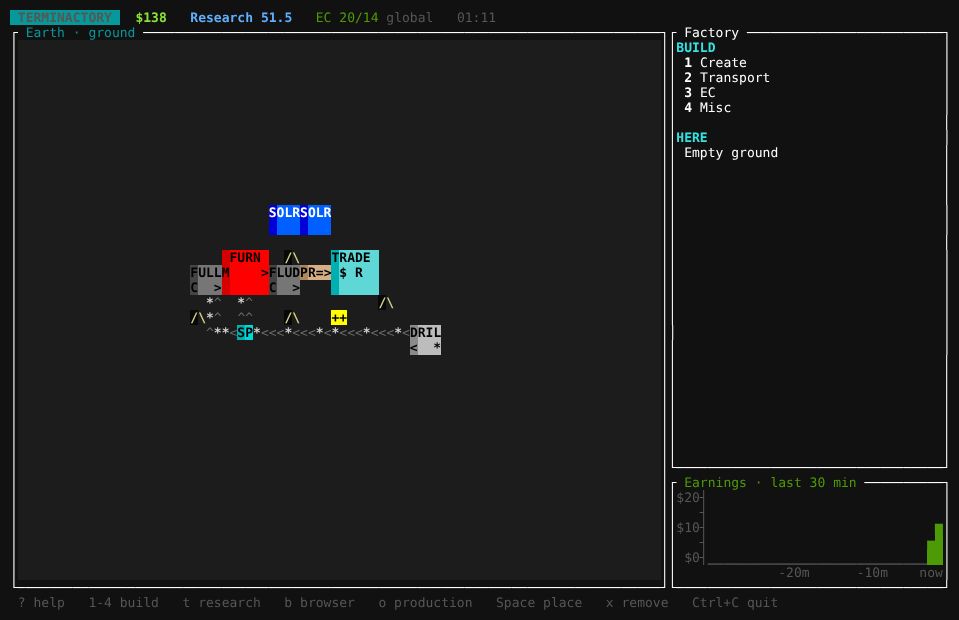
Terminactory is a product that runs a factory game in the terminal. When a coding agent finishes its work, the game shows the agent’s last reply.
It is today’s pick because you can tell that an agent has finished while you play.
- Found on
- Show HN
- Built with
- Rust, ratatui
The problem
When you give a coding agent a long task and do something else, it is hard to know whether the agent has finished or is waiting for input. The official Claude Code docs show how to get a desktop notification with a hook. You add a Notification hook to the settings file. The operating system then shows a notification when Claude waits for input or permission. If you follow the docs’ example, the notification always says "Claude Code needs your attention". It does not tell you what the agent replied. To read the reply, you have to go back to the agent’s terminal.
How it solves it
Terminactory was posted to Hacker News as a Show HN on November 14, 2026. The maker, snipedbywifi, says it is a game to play while you wait for an agent’s task to finish.
In the game, you mine copper, coal and iron with drills. You process them with furnaces and presses and sell the products. Money and research points unlock new machines. Agents send messages to the game with a shell command. In Claude Code, you register the command tfac hook for the Stop and Notification hooks. When the agent finishes, its last reply shows up on the game screen. When the agent waits for input, the game shows a notice. An agent other than Claude Code sends a message itself by running tfac msg.
What is different
The first difference is what the notification contains. A desktop notification set up from the Claude Code docs’ example shows a fixed sentence. Terminactory shows the agent’s last reply with its Markdown formatting. Claude Code passes JSON to a hook on standard input. tfac hook reads the last reply from that JSON and saves it as a Markdown file in ~/.terminactory/inbox. The game checks this folder about once a second and shows each new file as a message.
The second difference is when a notification appears. The operating system shows a desktop notification, so it appears even while you use another program. A Terminactory message appears only while the game is open. A message that arrives while the game is closed stays in the folder and appears when you open the game.
How it was built
- The repository has 212 commits from November 10 to November 14, 2026. 206 of them have a Co-authored-by line for Claude. In the Show HN post, the maker also says the game was built with heavy AI assistance.
- The code is 19,876 lines of Rust. The screen is built with the ratatui library.
- According to the README, the simulation uses no randomness and is separate from the drawing code. The README says this lets most changes be tested without a screen.
Running it
I cloned the repository on Linux and built it with Rust 1.88.0. I ran the game in a 120×40 terminal. I sent messages with the README’s test commands instead of a real agent. The hook test command pipes JSON into tfac hook. The JSON has the format that Claude Code passes to a hook.
- Install.
cargo install --path .took 40 seconds, and thetfacbinary was 5.9 MB.cargo testran 644 tests. 638 passed and 6 were ignored. - Demo.
tfac --demoshowed a small factory with drills, a furnace and a trade post. With the demo open, I ran the README’s hook test command andtfac msg. Both printed nothing and exited with code 0. But no message appeared in the game. The code shows that the demo does not read the message folder. The README does not say this. - Messages. I closed the demo and started a new game with
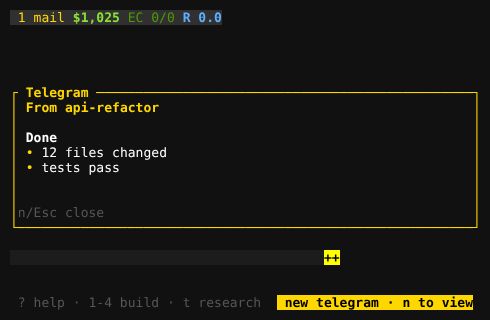
tfac. The 2 messages sent while the demo was open appeared in the sidebar one after the other. The heading, list and checkbox in thetfac msgmessage were shown with their Markdown formatting. When I sent the JSON of a Notification event, the message header showed the working folder name from the JSON and "needs you". When a message arrived, an in-game company also sent $25 as a gift. According to the code, this gift comes only once every 3 minutes. A message sent while no game was open also appeared the next time I opened the game. - Narrow window. At 60×20, the sidebar disappeared. Only the map and a one-line status bar were left. When a new message arrived, a "new telegram" note appeared at the bottom right. When I pressed n, a window opened with the message.
- Resources. The demo factory used 1.07 seconds of CPU time in 60 seconds. That is 1.8% of one core. It used 6.0 MB of memory.
- While closed. A new game has no factory that earns money, so I copied the demo factory’s save file to a normal save. I closed the game for 2 minutes. When I opened it again, a window said the factory had earned $35 and 96.1 research points. Then I tried to open a save that was already open in another terminal. The game did not start and printed the notice below.
$ tfac
save1 is already open in another window (process 3207). Switch to that window, or open another save: tfac --saves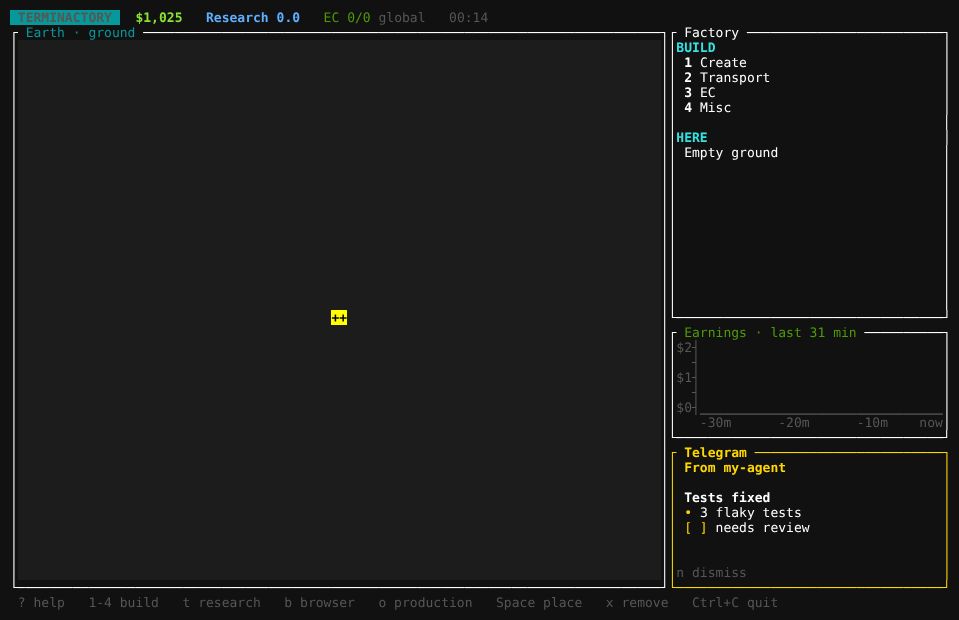
Not checked
- A real Claude Code hook. The next step is to register the hook in the Claude Code settings file and check that a message arrives when the agent finishes.
- The later part of the research tree. The machines for computers and oil unlock only after you research the earlier ones.
- macOS. According to the README, macOS and Linux are supported. Today’s run was on Linux only.
Verdict
It works. Messages sent with the hook command showed up in the game, and the factory kept earning while the game was closed. But the demo does not show messages, and the README does not say so. It is worth trying if you run coding agents in a terminal.
What to take away
- If a feature does not work in a demo mode, say so on the screen. Today the messages I sent while the demo was open did not appear until I started a new game.
- If an agent does not need to read a command’s output, the command should print nothing on success. A command’s output goes into the agent’s context and takes up tokens. Today
tfac msgandtfac hookprinted 0 bytes.
Getting started
git clone https://gitlab.com/snipedbywifi/terminactory && cd terminactory && cargo install --path .tfac
- You need
- Rust 1.88 or newer and a UTF-8 terminal. Terminactory supports macOS and Linux. On Windows, use WSL.
- Cost
- Free under the Apache-2.0 license.
The demo (tfac --demo) does not show agent messages. They appear in a game opened with tfac.
Steps select 1 ran.
Progress
- Day 3Site up
- Day 7Site up
- Day 15Site up
- Day 30Upcoming
- Day 90Upcoming
- Day 180Upcoming
- Day 365Upcoming
Latest check Day 15, Sun 2026.11.29
- Site
- 200
- HN points
- 112 → 175
This pick has no repository, so what changed is unknown. Only the site response and HN activity are checked.