Sun 2026.11.29
DragDropMath: algebra by dragging symbols
Today's pick: DragDropMath
DragDropMath is a product that lets you practice algebra by dragging the symbols of an expression. The symbols move only where the rules of math allow. Teachers can make their own exercise sets and share them as links.
It is today’s pick because students rewrite an expression themselves instead of reading a solution.
In four panels
1The problem
- The problemScanned or typed in
- The app rewrites itBuilds a step-by-step solution
- The finished solutionThe student reads it
The student reads the finished solution.
2How it works
- The problemAn exercise from a chapter or a teacher’s set
- Dragging a symbolOne step at a time, by the student
- Only allowed movesA symbol dropped elsewhere goes back
- The goalDone when it matches the goal
Ran today
In DragDropMath, the student rewrites an expression by dragging its symbols. A symbol moves only where the rules of math allow. If you drop it anywhere else, it goes back to where it was.
3What is different
BeforeDragDropMath
Who rewrites the expression
The app (Photomath)The student
Trade-offSolvable by dragging without thinking
Where problems come from
Scanned by the student (Photomath)Made by the site and teachers
Trade-offOnly problems that the 13 chapters’ moves can solve
4Running it
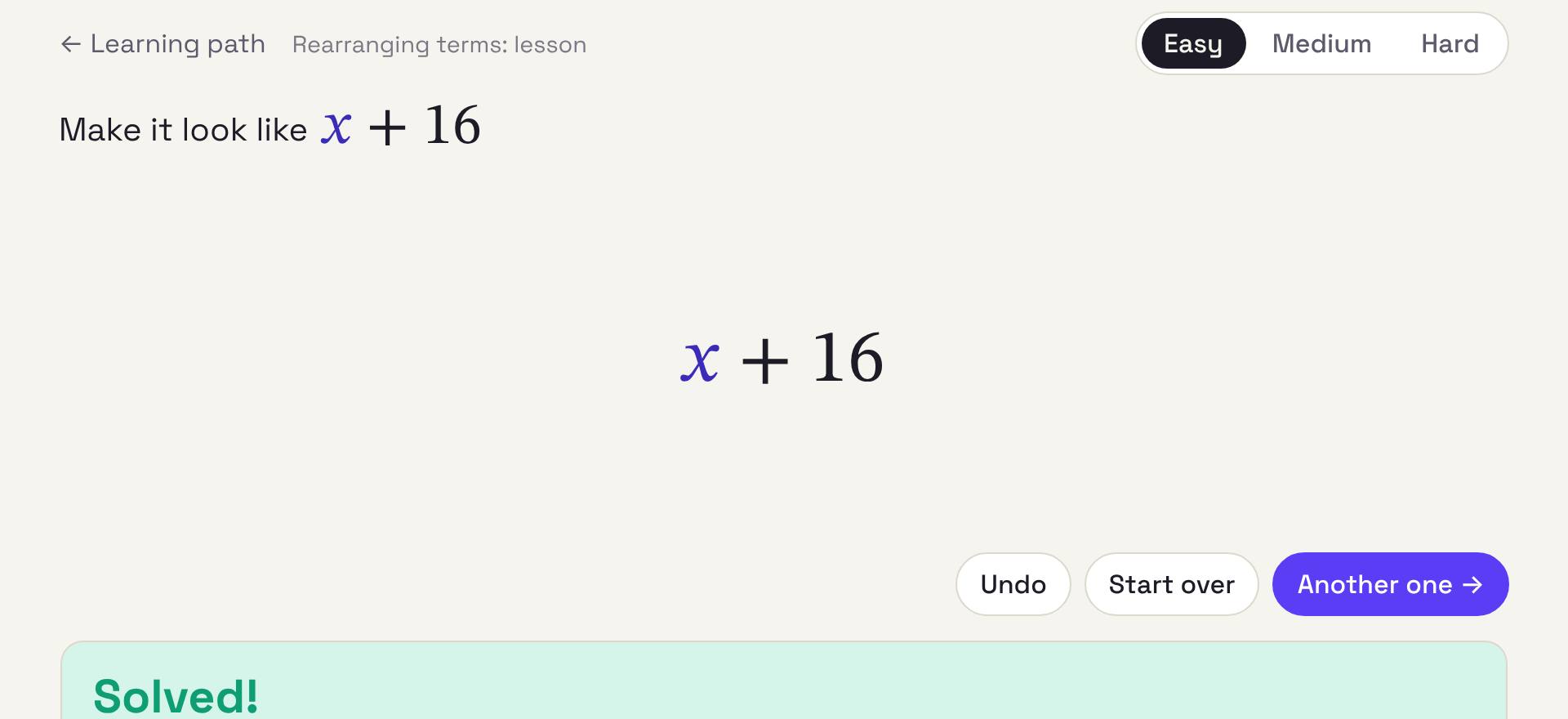
An easy exercise from chapter 1, in two moves
An easy exercise from chapter 1, solved in two moves. The board reached the goal, x + 16, and a message said it was solved.
- Found on
- Show HN
- Built with
- TypeScript, React, Vite, Dragology
The problem
People usually learn to simplify expressions and solve equations by writing them out on paper. On paper, a wrong step can be written down as easily as a right one. Photomath is a math app. When you scan or type a problem, it shows a step-by-step solution. Its official site says students check each step to understand the solution. But the app rewrites the expression. The student reads the finished solution.
How it solves it
Filippo Miatto, a physicist, posted DragDropMath to Hacker News as a Show HN on November 27, 2026. In DragDropMath, the student rewrites an expression by dragging its symbols. A symbol moves only where the rules of math allow. If you drop it anywhere else, it goes back to where it was. The maker says that when you cannot make a wrong move, wrong moves never become a habit. Each exercise gives a starting expression and a goal. The student turns the starting expression into the goal. There are 13 chapters, from rearranging terms to quadratic equations. In the code, each algebra move is one rule. For each symbol, the rules list the expressions you can make by moving it. The Dragology library accepts a drop only if the result is on that list.
What is different
First, it differs in who rewrites the expression. In Photomath, the app rewrites it. In DragDropMath, the student drags symbols and changes the expression one step at a time. A symbol dropped where it is not allowed goes back, so the student knows at once that the move was wrong. The trade-off is that a student can solve an exercise by dragging symbols around without thinking. A Hacker News commenter pointed this out. The maker replied that the Mind's eye mode makes up for it. In this mode, you choose the final answer from three options before you drag any symbol.
Second, it differs in where the problems come from. In Photomath, students scan the problems from their homework. In DragDropMath, the site makes exercises for each chapter. Teachers can also write their own sets. According to the README, the site checks each exercise in a set. The goal must follow from the starting expression, and the chapter’s moves must be able to reach it. The whole set is stored in the link, not on a server. The trade-off is that it only covers problems that the 13 chapters’ moves can solve. You cannot add a homework problem from a photo.
How it was built
- Filippo Miatto made 110 commits in the 18 days before the Show HN post. Every commit has a Co-authored-by line for Claude Opus 5.5.
- The tests check each rule against examples. They also put random values into the variables of the test expressions and check that each move keeps the value. Another test checks that each chapter’s moves can solve its exercises.
- The interface and chapter lessons are in 10 languages, including English, Italian, Spanish and German.
Running it
I cloned the repository and built it in a shell with an empty environment. Then I served the build locally. I used Playwright to drag the symbols.
- Install and build.
npm citook 4 seconds.npm run buildmade 2.3 MB of static files. - Tests.
npm testran in 77 seconds, and 3,454 tests passed. - An exercise. The easy exercise in chapter 1 asked me to turn 4·4 + x into x + 16. When I dropped x between the two 4s, the expression did not change and x went back. When I dropped one 4 onto the other, they became 16. When I moved x to the front, a message said it was solved.
- Network. Every request from the home, exercise and set pages went to the local server. Progress was saved in localStorage, and there were no cookies.
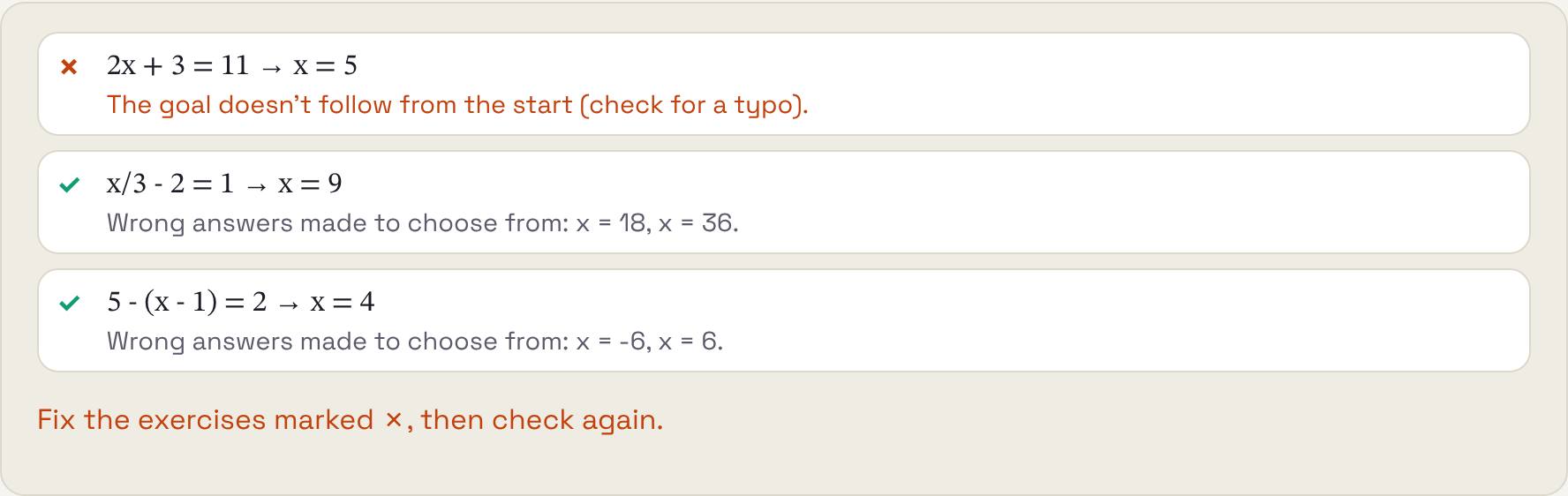
- Exercise sets. I entered 2x + 3 = 11 with the goal x = 5 and pressed Check. The page showed "The goal doesn’t follow from the start". With the goal x = 4, it said the exercise can be solved in 4 moves.
- Cube roots. A Hacker News comment said that ∛(27x) turned into 3·∛3·∛x. I wrote a script that loads the site’s rules and computes the value before and after each move at x = 2. In ∛3·∛3·∛x, the move that merges the two ∛3 made 3·∛x. The value changed from 2.6207 to 3.7798. ∛3·∛3 is ∛9, not 3. ∜5·∜5 became 5, though it should be √5. On √3·√3·√x, every move kept the value. A shortcut in the code turns a square root times itself into what is under it. The shortcut does not check that the root is a square root.
PROBE sqrt(3)*sqrt(3)*sqrt(x): 5 states, 0 unequal
PROBE root_3(3)*root_3(3)*root_3(x): 5 states, 1 unequal
  BAD root_3(3)*root_3(3)*root_3(x) --[merge-powers]--> 3*root_3(x)  (2.6207 vs 3.7798)
PROBE root_4(5)*root_4(5): 1 states, 1 unequal
  BAD root_4(5)*root_4(5) --[merge-powers]--> 5  (2.2361 vs 5.0000)
Not checked
- Touch on phones and tablets. The maker says work on the mobile interface has just started. Next, solve the same exercise with Playwright’s device emulation.
- A student opening a teacher’s link. Next, make a link after checking a set and open it in another browser.
Verdict
It works. A symbol dropped where it was not allowed went back, and I solved the exercise. But merging two cube roots or two higher roots, such as fourth roots, changed the value of the expression. It is worth trying if you want students to work each step themselves.
What to take away
- When you test rewrite rules with random values, vary the kinds of expressions too. For a rule that merges roots, include cube and fourth roots, not only square roots. DragDropMath’s test expressions had no product of two cube roots. So every test passed, yet merging cube roots changed the value.
- If a tool accepts only moves that its rules allow, show the name of the rule it applied. Two Hacker News commenters asked to see the name of the rule behind each move.
Getting started
git clone https://github.com/ziofil/dragdropmath && cd dragdropmathnpm ci && npm run build && npx vite preview
- You need
- Node.js and npm. To use the site, open dragdropmath.com in a browser. No account is needed.
- Cost
- Free under the MIT License.
Steps select 1 ran.
Progress
- Day 3Upcoming
- Day 7Upcoming
- Day 15Upcoming
- Day 30Upcoming
- Day 90Upcoming
- Day 180Upcoming
- Day 365Upcoming