Tue 2026.10.13
ESP32 iPhone Agent: handing an iPhone to an agent without a Mac
Today's pick: ESP32 iPhone Agent
ESP32 iPhone Agent is an open-source product that lets a vision model operate an iPhone directly. It uses a $7 ESP32-S3 board as the phone's mouse and keyboard and reads the screen over AirPlay mirroring.
It is today's pick because it lets an agent operate an iPhone the way a person does, with no Mac and no developer account.
- Found on
- GitHub
- Built with
- Python, FastAPI, Arduino, UxPlay, Claude Opus 5.5
The problem
According to the README, most iPhone automation goes through XCTest or WebDriverAgent. That path needs the following.
- A Mac and Xcode.
- A signed helper app.
- An Apple developer account. With a free account, the signature expires every 7 days.
- The accessibility tree, the list of buttons and text an app exposes to automation tools. Apps such as games do not provide one, so the method fails there.
The README's comparison table lists eight other projects that use an ESP32 Bluetooth mouse or an HDMI capture board. Most of them require a Mac, separate capture hardware, or an app installed on the phone.
How it solves it
ESP32 iPhone Agent handles the iPhone only the way a user does. The iPhone mirrors its screen to UxPlay on the computer over AirPlay. GStreamer converts the mirrored screen into JPEG frames. It sends input over USB HIDThe USB standard for input devices such as mice and keyboards, which operating systems recognize without a separate driver.. The iPhone recognizes a $7 ESP32-S3 board plugged into its USB port as a mouse and keyboard. A round pointer appears on screen when iOS AssistiveTouch is on. A click is a tap and a drag is a swipe. The board holds no logic. It connects to the server over Wi-Fi and executes one-line commands such as move, click and type. The model can be any OpenAI-compatible vision model. A planner writes a short plan from the goal and the screen, and an actor picks the next action from each new screenshot. Nothing is installed on the phone.
What is different
The pointer uses relative coordinates, so the server cannot know its position. Before a tap, the server nudges the pointer by 12 units and finds it on the mirrored screen. It then corrects the pointer position. After each action, it compares pixels to check whether the screen changed. It tells the model about a missed tap. If the same action repeats three times, the agent makes a new plan. The trade-offs are speed and the screens the agent cannot see. The README reports about 1.3 s per action on two DGX Sparks. The lock screen, Apple Pay and DRM video are not mirrored, so the agent cannot see them. Keyboard input is ASCII only.
How it was built
- Twenty commits were made on 2026-10-12. The last one came the night before this entry.
- Sixteen of them carry Claude Opus 5.5 in a Co-authored-by trailer.
- The first item in the README's Quick start is a prompt to paste into a coding agentAn AI program that reads and edits code and runs commands for a developer. Claude Code and Codex are examples.. The prompt tells the agent to flash the board, install UxPlay and the server, and write .env.
- The Python server is about 1,100 lines, and the firmwareThe program built into a device to control its hardware. On devices such as TVs, it means all the system software, including the operating system. is a 155-line Arduino sketch. There are 28 tests.
Running it
Today I checked the server only. With no board and no iPhone, I did not see the agent tap anything.
- Install and tests. Installation took 18 seconds with
python3 -m venvandpip install -e ".[dev]". There are four dependencies (FastAPI, uvicorn, httpx and Pillow), and the virtual environment is 91 MB. The 28 tests passed in 1.45 seconds. - Starting the server. With a fake model address in
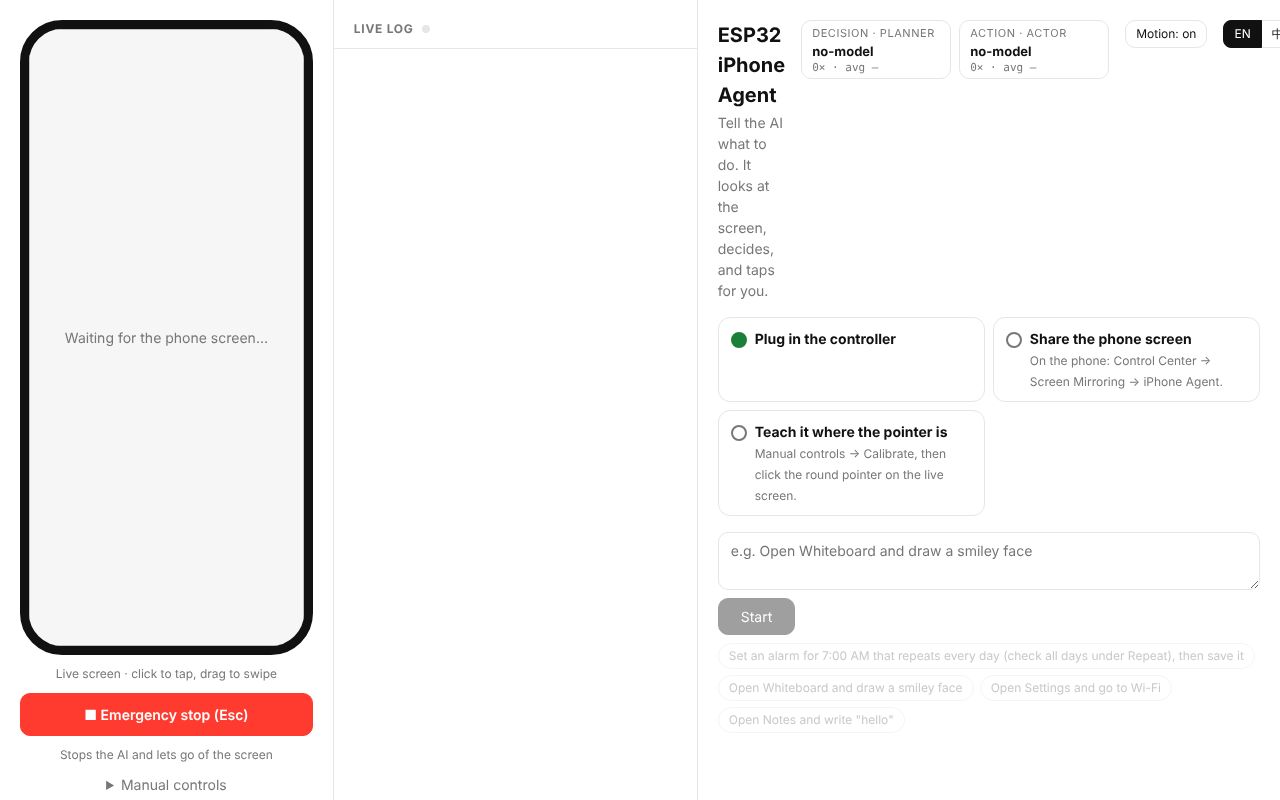
.env, the server opened its web UI 583 ms after launch. Without UxPlay, the screen-capture thread ended with FileNotFoundError, but the server kept working. - A fake board. To check the board protocol, I wrote a TCP client that connects to port 7300 and answers nothing but ok. The server accepted it as the board, and the status changed to device true. The first step in the web UI, Plug in the controller, turned green.
- Passing commands. I sent ping and move 10 -5 through the debug-only /api/raw. The client received both lines unchanged. As the README says, the board holds no logic.
- Refusals. The server refuses a tap without calibration (409 pointer not calibrated). It also refuses to start the agent without a screen (409 no phone screen).
- Screenshot comparison. I also checked how the code compares screenshots. It masks the pointer and the status bar and compares the remaining pixels. It treats a difference of six or more pixels as a change. Even a change as small as one checkmark counts.
status 200 after 583 ms
hidagent.device board connected from ('127.0.0.1', 50552) hello power-on 1234
hidagent.device move 10 -5 -> ok (0 ms)
"POST /api/tap HTTP/1.1" 409 Conflict
Not checked
- The full agent loop. The board has to be flashed and an iPhone mirrored before the agent can plan and tap. The README's 1.3 s per action was not measured either.
- The calibration in phone.py. Next time, check whether the nudge method finds the pointer on both light and dark backgrounds. Also check how far the pointer drifts after the AssistiveTouch pointer speed changes.
Verdict
The server runs. Four commands install and test it. Without the board and a phone, though, the agent can neither see a screen nor tap one. It fits if you want to hand an iPhone to an agent with one computer and a $7 board instead of a Mac. You also need to accept more than a second per action. This product is not the right choice for work that passes through screens that are not mirrored, such as the lock screen or a payment screen.
What to take away
- If the screens you automate do not expose a list of their buttons and text (games, for example), consider an approach that uses only screen pixels and an input device. This product does it with AirPlay and USB HID.
- If hardware is part of the product, check first that the server runs and the tests pass without it. Here a fake board that only answers "ok" was enough to confirm the protocol.
- Add a step in the agent loop that checks whether the screen changed after each action. Here a comparison with a six-pixel threshold tells the model about a missed tap.
Getting started
git clone https://github.com/onehumanbeing/esp32-iphone-agentcd esp32-iphone-agent/server && python3 -m venv .venv && .venv/bin/pip install -e .cp .env.example .env && set -a && . ./.env && set +a && .venv/bin/python -m hidagent
- You need
- Python 3.10 or later
- A XIAO ESP32S3 board (about $7), arduino-cli and the ESP32 core 3.x
- UxPlay (an AirPlay receiver) and GStreamer
- An OpenAI-compatible vision model API, hosted or self-run
- AssistiveTouch enabled on the iPhone and a 2.4 GHz Wi-Fi network
- Cost
- MIT licensed and free. The costs are the board (about $7) and the vision model API. The README says development used a local model on two NVIDIA DGX Sparks.
Flash the board with hardware/flash.sh. The server opens its web UI at http://<computer-ip>:8890. Today only the server ran, with no board and no phone.
Steps select 1 ran.
Progress
- Day 3Missed
- Day 7Active
- Day 15Active
- Day 30Active
- Day 90Upcoming
- Day 180Upcoming
- Day 365Upcoming
Latest check Day 30, Wed 2026.11.11
- Commits since launch
- 182
- Stars
- 473 → 4,809
- Latest release
- cli-v0.1.4
- Last commit
- 2026.11.10
- The iPhone app reached 1.0. The board receives AirPlay on its own hotspot and talks to the app over BLE, so the app runs the agent without a computer (v1.0.0).
- It can hear the phone. The board forwards AirPlay audio, the app transcribes it on the iPhone, and the agent sees what it heard. This is off by default (v0.2.4).
- Long tasks no longer stop at 40 rounds, and the safety cap is 300. A stopped or failed run can continue, even after a relaunch (v0.2.4).
- Chinese is typed as pinyin through the board’s keyboard, without the clipboard. Apps are opened through Spotlight (v1.0.0).
- The esp32agent CLI connects to the board over Wi-Fi and falls back to BLE (cli-v0.1.2).
Day 3 missed: Progress checks started on 2026.10.16. This date had already passed.