Fri 2026.10.30
Fabivo: from a furniture sketch to the cutting order
Today's pick: Fabivo
Fabivo is a product that helps you design plywood furniture and plan the cuts. You sketch the front of a piece in the browser, and the sketch becomes a model of boards with dimensions. Fabivo then lays the boards out on sheets and numbers the saw cuts in order.
It is today’s pick because it lets you build plywood furniture without planning the board layout and cutting order yourself.
- Found on
- Show HN
- Built with
- TypeScript, React, three.js
The problem
You set each board’s size when you build plywood furniture yourself. You also plan the sheet layouts and cutting order. A poor layout uses more plywood. A layout planned without the cutting order can require cuts that a saw cannot make.
On the product page, the maker says most furniture plans start on a napkin and die in a spreadsheet. A spreadsheet can hold the list of boards. But you still lay the boards out on sheets and order the cuts by hand.
How it solves it
Fabivo was posted on Hacker News as a Show HN on October 29, 2026. You sketch the front of a piece by hand. Fabivo squares the crooked lines and builds a parametric modelA design model that stores dimensions and the relationships between parts. When you change one value, the parts tied to it are recalculated. of sides, shelves and dividers.
Next, the optimizer lays the boards out on real sheet sizes. You can set the saw kerfThe width of material a saw blade removes as it cuts. A cut plan must leave this gap between parts. and the grain direction. You can also choose whether to use less plywood or make fewer cuts. The result is a numbered cutting order for each sheet, followed by the assembly steps. A photo feature also lets AI build a furniture model from a picture.
What is different
The first difference is that the drawing is the model. In a spreadsheet, you type the board list. When one size changes, you fix each related board by hand. On the product page, the maker says every board stays connected to the model, so changing one dimension updates the connected boards. The tradeoff is that you can only draw box furniture. The hint on the sketch screen says to draw one outer rectangle and then add shelves and dividers. A diagonal becomes a door and a short dash becomes a drawer.
The second difference is that the cut plan follows how a saw cuts. According to the maker’s cut-list optimizer page, Fabivo plans only guillotine cuts. Every cut runs from one edge of the sheet, or of an earlier strip, to the other. panel sawA machine that cuts large sheets by moving a blade along a straight line across them. and track sawA circular saw you push along a rail laid on the sheet. The rail keeps long cuts straight. cut this way, so you can follow the numbered steps. Cutting this way limits the possible layouts. Fabivo’s plan may waste more plywood than a free-form layout for a CNC routerA machine that cuts boards with a spinning bit along a programmed path. It does not have to cut from edge to edge, so parts can be laid out freely..
The third difference is that the design and cutting tools run in the browser. Projects are also saved in the browser. So it works in a shop with weak Wi-Fi. But the photo feature uses a server.
How it was built
- The 46 commits in the GitHub repository date from July 19 to August 24, 2026. Two of them have a Co-authored-by trailer for Claude.
- The repository’s README describes only an offline cut optimizer, and the code for the photo feature is not in the repository. The site seems to run a newer version than the repository.
- The source is 35,322 lines of TypeScript, not counting 7,548 lines of tests.
Running it
I opened fabivo.app with Playwright and used it without an account. I tried a photo, a sketch and a preset.
- Photo. I uploaded a bookcase image I drew and sent it. The app showed
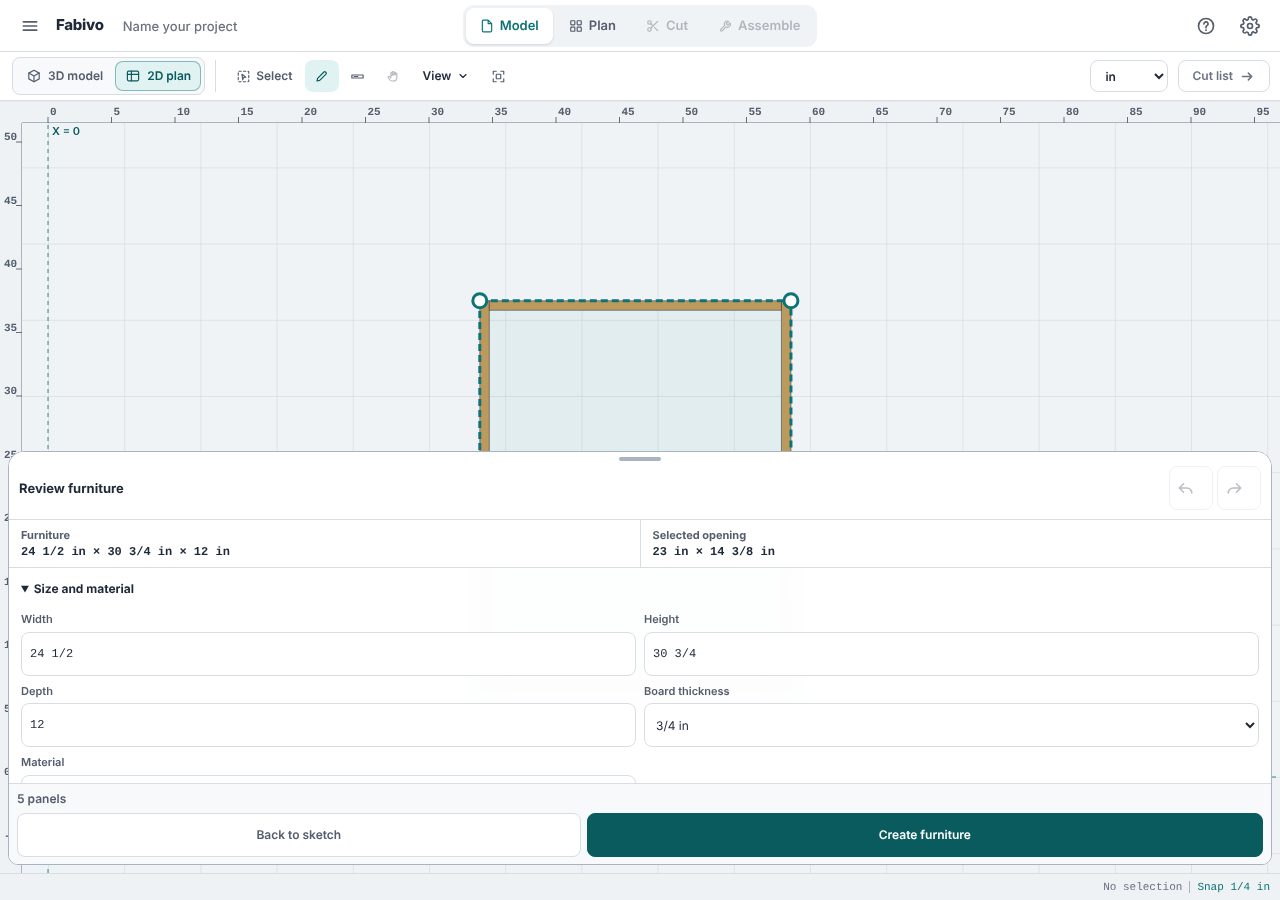
Too many requests. Wait and try again. (Retry-After: 11335). I could retry only after 11335 seconds, about 3 hours. It was my first request of the day. The server’s/api/agentreturned 429, so I could not check the photo feature. - Sketch. I drew one crooked rectangle stroke and one shelf stroke. Fabivo interpreted them as a 24 1/2 × 30 3/4 × 12 in piece with 5 panels (screenshot 1). Its cut list needed 1 sheet and 7 cuts.
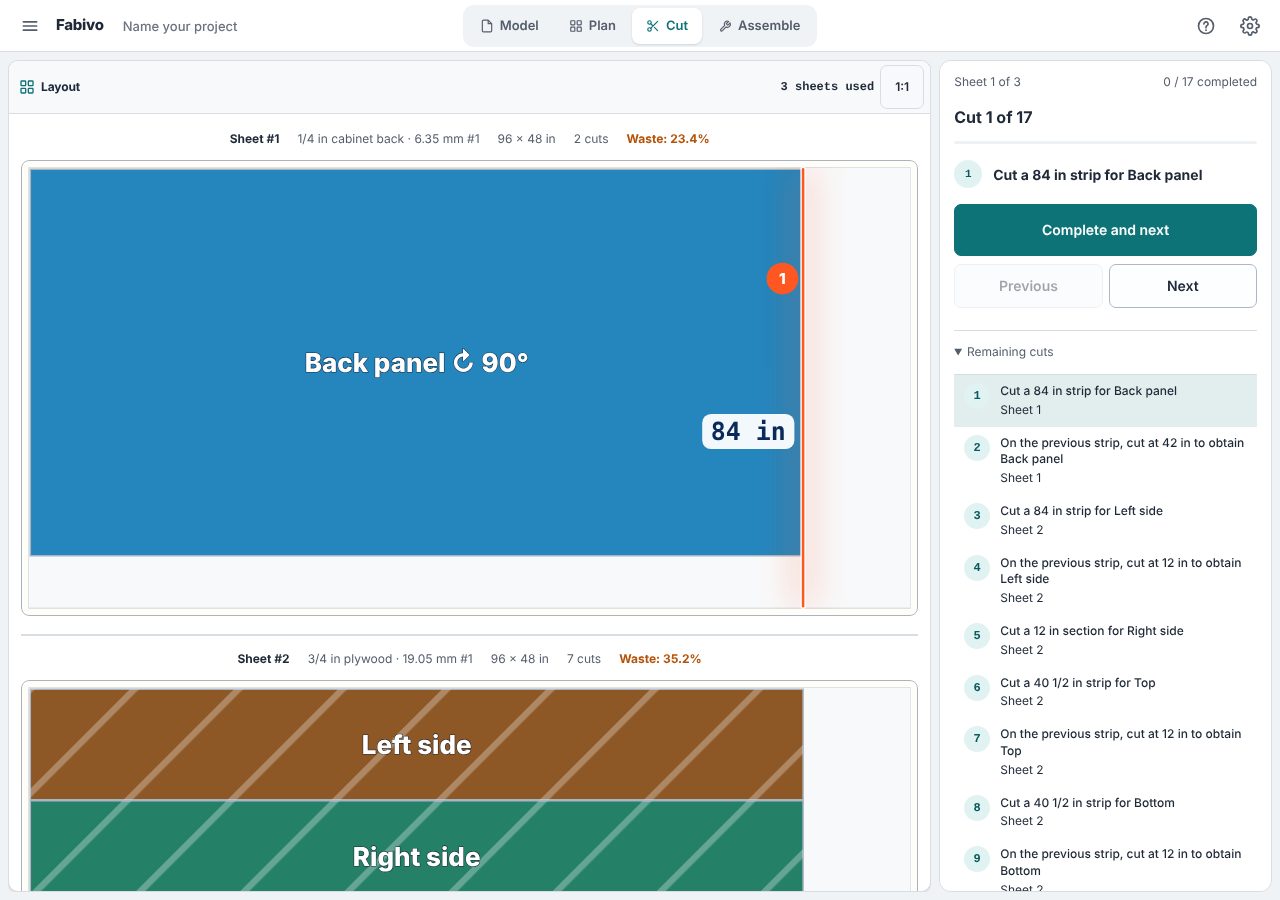
- Preset. The bookcase preset (42 × 84 × 12 in, 10 panels) needed 3 sheets of 96 × 48 in plywood. The plan left 35% of the three sheets unused and required 17 cuts.
- Cutting order. The Cut tab listed 17 numbered steps, sheet by sheet, such as "Cut a 84 in strip for Back panel" (screenshot 2).
- Network. The browser sent no POST request to the server while I went from the sketch to the cutting order.
- Offline. I disconnected the network and reloaded the app. It opened and showed "Offline · local tools still work". The plan was still there.
Not checked
- Building a furniture model from a photo. After the rate limit lifts, photograph a piece of furniture and compare the model’s dimensions with the piece.
- The assembly guide. Cut and build the bookcase preset by following the Assemble tab, and check its order and parts list for errors.
Verdict
It works. A sketch and a preset both led to a numbered cutting order. But the server’s rate limit blocked the photo feature today. Fabivo is worth trying if you build bookcases, cabinets or other box furniture from plywood.
Getting started
https://www.fabivo.app/?lang=enChoose a furniture preset → Generate cut list → Start cutting
- You need
- A browser such as Chrome or Edge
- Cost
- Free, with no account.
Projects are saved in the browser. The photo feature uses a server, which rejected requests today because of a rate limit.
Steps select 1 ran.
Progress
- Day 3Upcoming
- Day 7Upcoming
- Day 15Upcoming
- Day 30Upcoming
- Day 90Upcoming
- Day 180Upcoming
- Day 365Upcoming