Thu 2026.11.12
AssemblyForNeovim: an assembly window inside Neovim
Today's pick: AssemblyForNeovim
AssemblyForNeovim is a product that shows the machine instructions compiled from your C, C++ or Rust code in Neovim.
It is today’s pick because you can check assembly without pasting code into a website.
- Found on
- Show HN
- Built with
- Lua
The problem
C, C++ and Rust developers sometimes look at the machine instructions their code compiles to. They check how the optimizer changed a loop, or whether a function call was inliningAn optimization where the compiler puts a function’s instructions into the calling code instead of calling it. The call cost goes away.. A common tool for this is Compiler Explorer (godbolt.org). According to its README, it is a website that shows the compiled result in real time as you edit code.
You paste your code into the site and pick the compiler and options again. The site does not have your project’s headers and macros. If the function you want to check uses those headers or macros, it does not compile as is.
How it solves it
AssemblyForNeovim was posted on Hacker News as a Show HN on November 11, 2026. In the post, the maker, 0xdeadf1sh, says it needs no internet connection and uses a locally installed compiler. In a comment, the maker says it was built for hobby projects such as renderers written in C and C++.
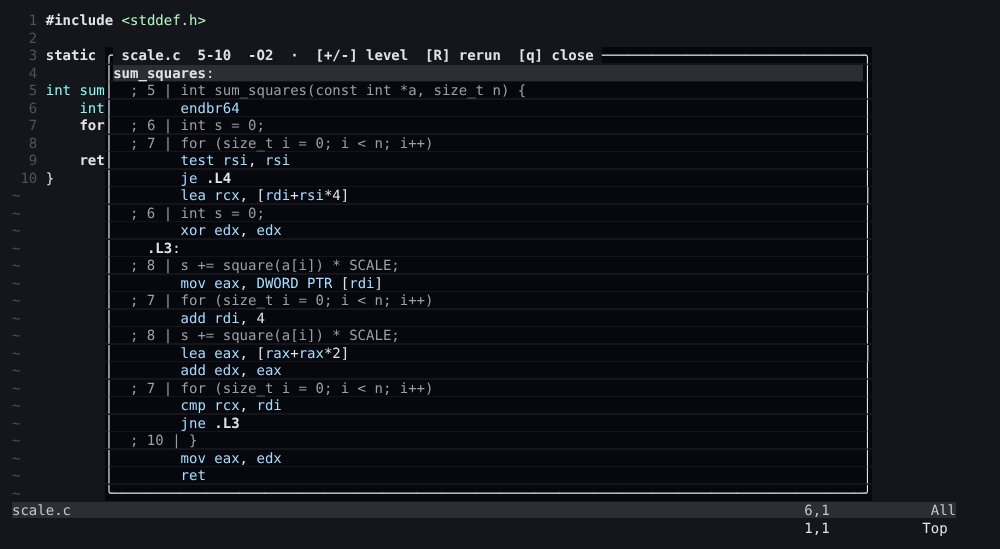
In NeovimA text editor based on Vim. You use it in the terminal with the keyboard and extend it with plugins written in Lua., you put the cursor inside a function and press the leader keyIn Vim and Neovim, a key you press before your own shortcuts. The default is the backslash (\). followed by the letter a. This is written as <leader>a. You can also select some lines and press the same keys. The plugin then compiles the whole file to assembly with your local compiler. The compiler also emits debug info, which records the source line that each instruction came from. The plugin uses these line numbers to keep only the instructions from the chosen lines. It shows them with the source lines in a floating window. In the window, + and - change the optimization level. If the project has a compile_commands.jsonA file that lists the compiler command and options used to build each file in a project. Build tools such as CMake generate it, and editors and analysis tools read it., the plugin uses the compile options written there.
What is different
The first difference is where the code is compiled. Compiler Explorer compiles on the website’s servers. AssemblyForNeovim runs the compiler on your own computer. Your code never leaves the machine, and the plugin uses the macros and header paths from compile_commands.json. The tradeoff is that you can only use the compilers installed on your computer. According to its README, Compiler Explorer offers several compilers for each language, so you can compare results. You can also install Compiler Explorer yourself with local compilers, but you still use it in a browser, outside the editor.
The second difference is how much it shows. Compiler Explorer shows the assembly for the whole file. AssemblyForNeovim shows only the instructions from the chosen lines. The tradeoff is that when a function defined outside the range is inlined, its instructions drop out, even though they run inside the range. The debug info records inlined instructions with the line number where that function is defined.
How it was built
- The repository has 2 commits. The first, on October 9, 2026, adds the whole plugin, 398 lines of Lua. The second adds a video to the README. The Show HN post came a month after the first commit.
- It has no Lua dependencies. It uses only the APIs built into Neovim for running processes, tree-sitterA library that parses source code into a syntax tree. Editors load a parser for each language to find where a function starts and ends, or to highlight syntax. and finding files.
- The license is the Unlicense, which puts the code in the public domain.
Running it
I loaded the plugin in the official Neovim 0.12.6 release, with GCC 13.3 and Rust 1.97. I used the plugin’s :Asm command and <leader>a on 4 test files I wrote: 2 in C, 1 in C++ and 1 in Rust.
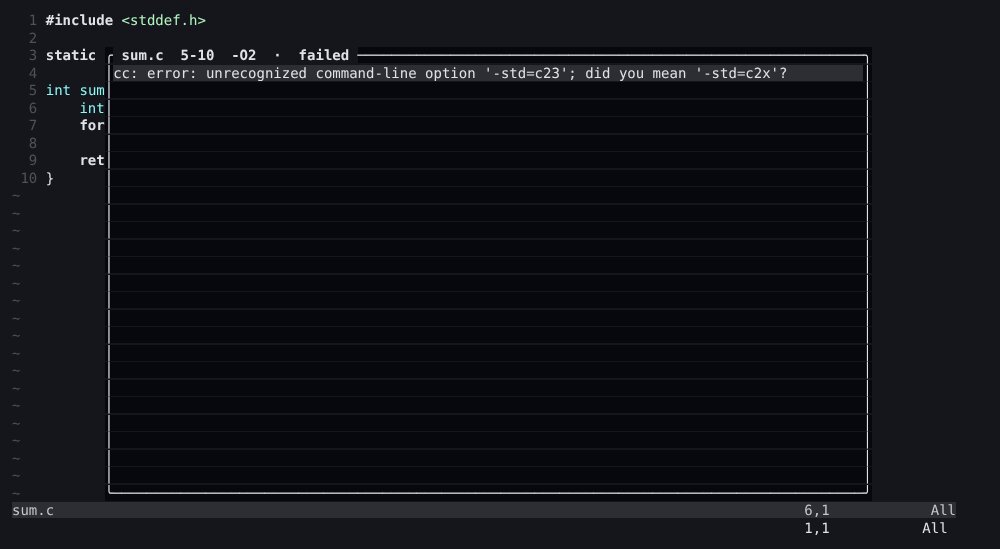
- C defaults. A C file with no compile_commands.json did not compile. The plugin compiles C with
cc -std=c23. The cc on Ubuntu 24.04 is GCC 13.3. It did not recognize-std=c23and suggested-std=c2x. - compile_commands.json. The code compiled with a compile_commands.json listing
-std=c17 -DSCALE=3 -O0. The instructionlea eax, [rax+rax*2], which multiplies by 3, showed that SCALE was 3. The plugin dropped-O0and used the level chosen in the window,-O2by default. Pressing-changed it to-O1, then-O0. - Inlining. I pressed
<leader>ain sum_squares, lines 5 to 10. The window showed the loop’s instructions, but the multiply instructionimul eax, eaxwas missing. It comes from square(), which is defined on line 3. The compiler inlined square(), but the debug info still records line 3 forimul. When I put the cursor on line 3,imulappeared as part of sum_squares. - Picking the function. When I turned on tree-sitter in the C buffer with
vim.treesitter.start(), the plugin picked the whole function, lines 5 to 10. Without it, the buffer had no syntax tree, and the plugin picked only the cursor line. Neovim 0.12.6 does not come with parsers for C++ or Rust. In a C++ function, the window showed only the instructions for theforline, where the cursor was, so the add instruction in the loop body was missing. - Rust. For a
pub fnat-O2, a note said there was no assembly to show. According to the note, this is by design. Lowering the level to-O1with-showed the instructions. - Time. I timed scale.c and the C++ file 3 times each, from running
:Asmuntil the assembly showed up. It took 21 to 25 ms for scale.c and 174 to 220 ms for the C++ file that includes<vector>. Running the same compiler command alone took 19 to 27 ms for C and 187 to 213 ms for C++. The ranges overlap, so the time is mostly compile time.
  ; 8 | s += square(a[i]) * SCALE;
        mov eax, DWORD PTR [rdi]
  ; 7 | for (size_t i = 0; i < n; i++)
        add rdi, 4
  ; 8 | s += square(a[i]) * SCALE;
        lea eax, [rax+rax*2]
add edx, eax$ cc -std=c17 -DSCALE=3 scale.c -S -g -O2 -masm=intel -o -
mov eax, DWORD PTR [rdi]
add rdi, 4
imul eax, eax # .loc 1 3, the line of square()
lea eax, [rax+rax*2]
add edx, eax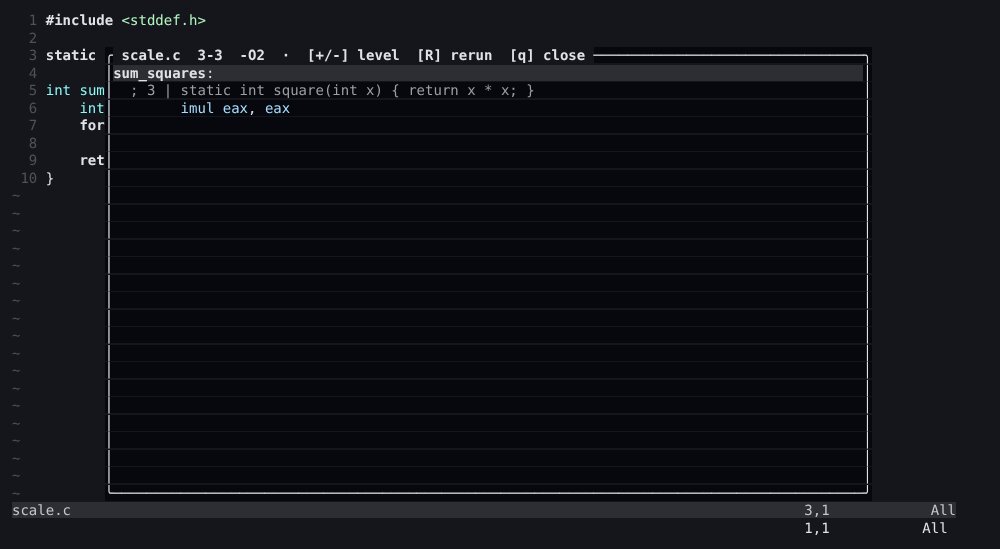
Verdict
It works. Assembly for C, C++ and Rust showed up in a window inside the editor. But when a function defined outside the chosen range is inlined, its instructions drop out of the window. At commit 148cec5, C files without a compile_commands.json fail to compile on GCC 13 because of the default option -std=c23. On November 12, the maker merged commit 820949a to fix this. It is worth trying if you often check C, C++ or Rust optimizer output in Neovim.
What to take away
- If your tool filters assembly by debug-info line numbers, show the instructions inlined into the chosen function separately, even when their line numbers fall outside the range.
- Before you add a compiler option as a default, check that the user’s compiler supports it. AssemblyForNeovim runs
-dumpmachineto check whether the target is x86, but adds-std=c23without a check.
Getting started
lazy.nvim 설정에 0xdeadf1sh/AssemblyForNeovim 을 추가하고 require("asm").setup() 호출함수 안에서 <leader>a, 또는 줄을 선택하고 :Asm
- You need
- Neovim. C and C++ need cc and c++, and Rust needs rustc and cargo. To see a whole function, you need a tree-sitter parser for the language. You must also turn on tree-sitter for the open file.
- Cost
- Free, Unlicense (public domain).
C files are compiled with -std=c23 by default, which GCC 13 does not recognize. With GCC 13, you need a compile_commands.json. The plugin then uses that file’s options, except the optimization level.
Steps select 1 ran.
Progress
- Day 3Some commits
- Day 7Quiet
- Day 15Some commits
- Day 30Upcoming
- Day 90Upcoming
- Day 180Upcoming
- Day 365Upcoming
Latest check Day 15, Thu 2026.11.26
- Commits since launch
- 0 → 4
- Stars
- 170 → 229
- Last commit
- 2026.11.19
- HN points
- 90 → 107
- Passing `key` to `setup` now changes the default `<leader>a` shortcut.