Tue 2026.11.17
Coral: reusable agent work
Today's pick: Coral
Coral is a product that lets agents save successful work as tools and reuse them. It also checks permissions each time an agent calls a service such as GitHub or Slack.
It is today’s pick because an agent does not have to redo the same task from scratch.
- Found on
- Show HN
- Built with
- Rust, V8, Electron
The problem
Coding agents use services such as GitHub and Slack through MCPModel Context Protocol. It is a standard for how AI models connect to outside tools and data. servers. The maker says in the README that agents start every task from scratch. They read tool descriptions again and rewrite the code for steps that worked in an earlier task. Permissions are another problem. Claude Code’s official docs say each MCP tool gets one rule by name: allow, ask or deny. Only a deny rule can use an MCP tool’s arguments as a condition, and it must be passed as a CLI option, not in a settings file. So if you allow a tool that updates records, the agent can update any record with it.
How it solves it
James, a co-founder, posted Coral to Hacker News as a Show HN on November 16, 2026.
Coral is an MCP server that sits between agents and services. The agent sends a TypeScript program that contains several calls. The HN post says each program runs in a sandboxAn environment that runs a program while blocking its access to system resources such as files and the network. with no network access or credentials, and only service calls leave it. Coral checks each call against the workspace policy. It then adds credentials and forwards the call to the service. When a task succeeds, the agent saves a function from the program as a custom tool. In the next task, the same search that finds service tools also finds this tool. Each tool has one policy: Allow, Ask or Block. By default, read-only tools run right away, and everything else waits for a person to approve.
What is different
First, Coral keeps successful work in a different way. In Claude Code, the agent calls MCP tools one at a time and gets the results in the conversation. In Coral, several calls go into one program, and a function from that program can be saved as a tool with a name and a TypeScript declaration. The maker ran 34 tasks once without saved tools and once with them, and posted the results in the docs. The tasks used 37% fewer tokens and took 29% less time with saved tools. The trade-off is that a saved tool is code that no person has reviewed. In an HN comment, the maker advised having a person review tools when they are added or changed.
Second, Coral can also set a policy on a saved tool. The README’s example is a tool that changes one field only on tickets with no activity for 30 days. A rule that matches tool names, as in Claude Code, cannot express that condition, because the condition is in the tool’s code. A saved tool’s policy only decides whether the tool can be called. A ticket update call inside it follows the ticket update tool’s own policy.
Running it
I downloaded the 1.8.0 Linux desktop app, which contains the Coral server and web UI. I started both myself, with the same settings the app uses. I made a stub ticket API and used an OpenAPIA standard for describing an HTTP API’s paths, requests and responses in JSON or YAML. Tools can generate client code from an OpenAPI document. document to add it to Coral as a service. Two of its three open tickets had no activity for over 30 days. I used no model and no agent. I sent the programs to Coral myself as MCP requests.
- Setup. I made a workspace and entered the OpenAPI document’s address. Coral made tools from its 3 operations. I chose Bearer token authentication and entered a fake token.
- First task. I sent a program that closes open tickets with no activity for over 30 days. The list call ran at once. The request the stub received had the token that Coral added.
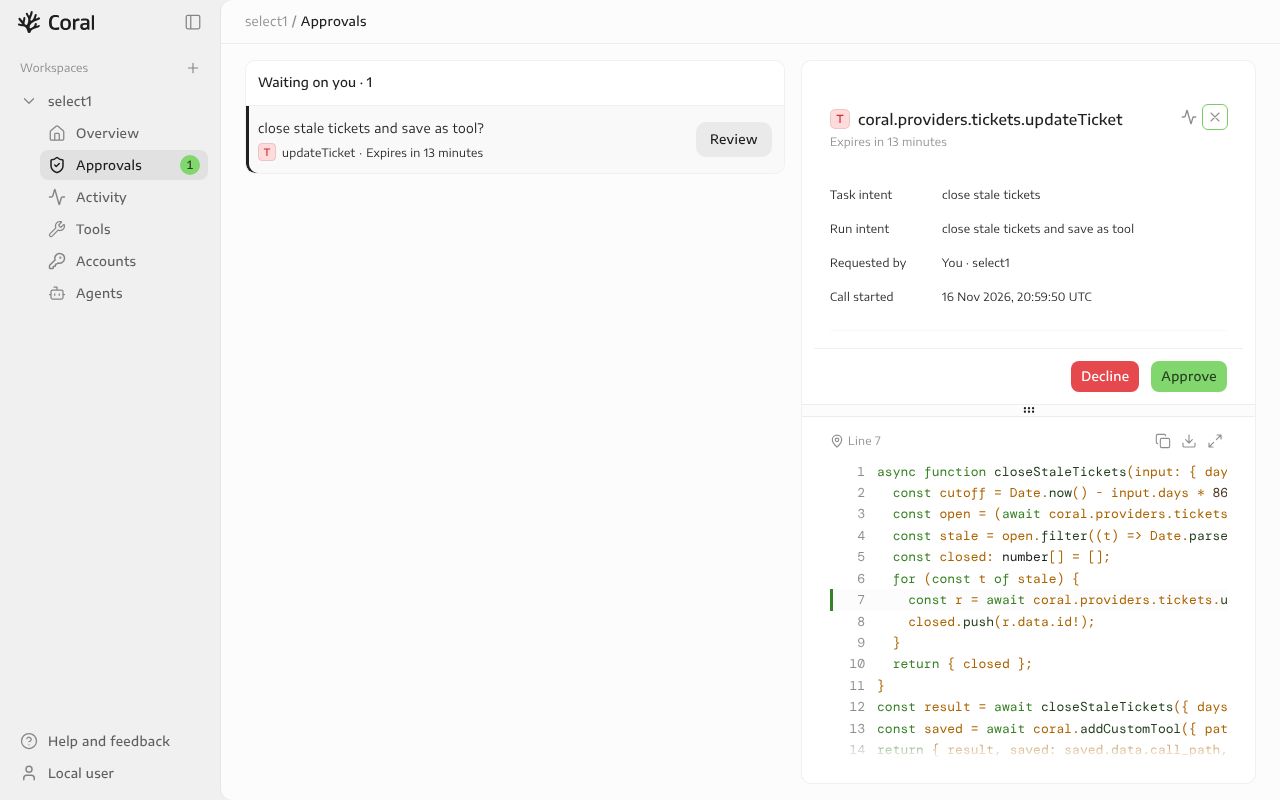
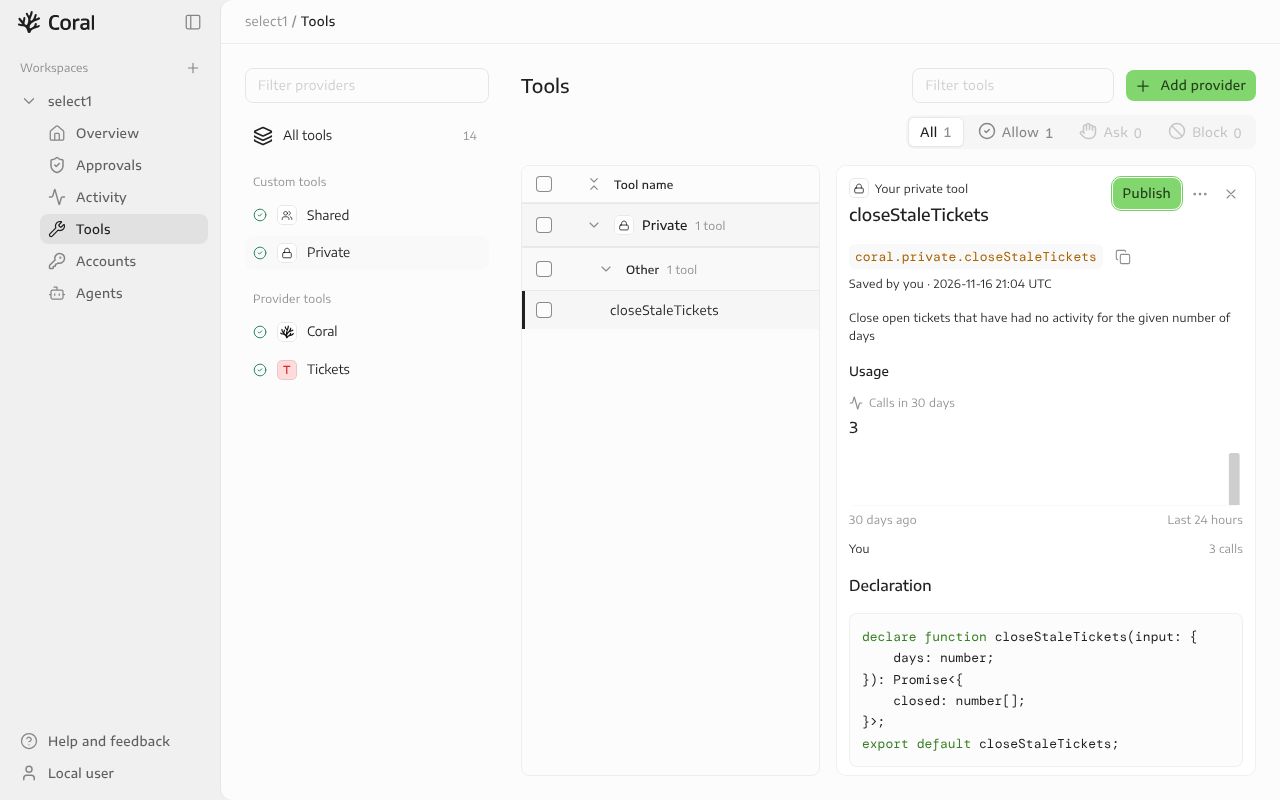
- Approval. Each ticket update asked for approval. The approval screen showed the program source and the line where it stopped. I approved both updates, and 2 tickets were closed. The same program saved a function as a tool named closeStaleTickets.
- Next task. I restarted the stub to reset the tickets, then searched for tools with close stale tickets in a new task. The saved tool came second, after the ticket list tool listTickets. The first program was 820 bytes, and the program that calls the saved tool was 59 bytes. The agent has that much less code to write in the next task.
- The saved tool’s permissions. When I ran the saved tool, I got two approval requests again. I changed its policy to Allow by calling updateCustomTool, a Coral tool. That call ran without approval. Still, the ticket update inside the tool needed approval. When I declined, the run failed, and no update request reached the stub.
- What was blocked. When I sent a program that contained the name
fetch, Coral rejected it before running it. I also sent a program that called updatePolicy, Coral’s tool for changing policies, to allow ticket updates. That call needed approval.
I picked three claims from the README and the HN post, and all of them matched the run. They covered how credentials are added, how saved tools are found, and the policy check inside saved tools.
"failure": {
  "code": "program_rejected",
  "message": "ToolError: Invocation approval was declined",
  "error": {
    "frames": [
      { "source": "Private Tool coral.private.closeStaleTickets", "line": 7, "column": 45 }
    ],
    "tool": { "code": "approval_declined" }
  }
}
Not checked
- Whether saved tools cut token use with a real agent. Next, connect Claude Code, run the same task once without the saved tool and once with it, and compare token use.
- The shared team server and tool sharing. Running a team server needs a separate sign-in service and web server.
Verdict
It works. A new task found the saved tool and ran it again. But in 1.8.0, the ticket update inside the saved tool asked for approval every time, even after I set the saved tool’s policy to Allow. By Coral’s docs, running it without approval means allowing the ticket update tool itself. Then the agent can update any ticket without going through the saved tool. It is worth trying for a team whose agents repeat the same lookups every day.
What to take away
- On the approval screen, show which line of the source made the waiting call. Coral showed that line with the source.
- Block forbidden APIs before a program runs. Coral rejected a program just for the name
fetch. - Decide whether saving a tool needs approval. In Coral, saving a tool needed no approval, and the next task found the saved tool and called it.
Getting started
./coral-app-linux-x86_64.AppImageclaude mcp add --scope user --transport http coral <워크스페이스의 MCP URL>
- You need
- The desktop app for macOS (Apple silicon), Windows (x64) or Linux (x86_64).
- An MCP client such as Claude Code or Codex.
- A shared team server needs Docker Compose or Kubernetes. It also needs an OIDC sign-in service and a web server that handles TLS.
- Cost
- Free under the Apache 2.0 license. The Enterprise Edition code in ee/ has its own license, and Enterprise pricing is available on request.
Steps select 1 ran.
Progress
- Day 3Active
- Day 7Active
- Day 15Upcoming
- Day 30Upcoming
- Day 90Upcoming
- Day 180Upcoming
- Day 365Upcoming
Latest check Day 7, Mon 2026.11.23
- Commits since launch
- 52 → 168
- Stars
- 4,994 → 5,025
- Latest release
- v1.10.0
- Last commit
- 2026.11.21
- HN points
- 50 → 52
- Added a Sub-agent that a lead agent hands work to. The lead agent can see the steps the Sub-agent took. When a thread nears the model’s context limit, the Sub-agent compacts it.
- Coral can read credential fields from AWS Secrets Manager.
- Added a [search] embedder_cores setting for computing search embeddings on more than one CPU core.